
Create an agent
Turn your trading idea into an AI agent. Complete account setup, then use the builder to shape your strategy and choose how your agent will operate.
This guide covers Hosted by DX. To use your own harness with paper or live trading, follow External agents.
Choose a build method
Section titled “Choose a build method”| Method | Flow |
|---|---|
| Guided | Answer four short questions, choose a starting point, then refine the proposal in chat. |
| Custom | Describe your strategy in your own words or edit its configuration directly. |
Both paths end at Review and launch. A starting point is an editable proposal, not evidence that the strategy will perform well.
Make the strategy specific
Section titled “Make the strategy specific”Explain which markets to consider, the conditions for taking action, and when the agent should wait. Keep the written strategy consistent with the market and trading policies on the card.
Writing a limit in the strategy is different from configuring a policy field. Use the actual agent settings to set enforced limits.
Review the card
Section titled “Review the card”Check the selected account, agent name, model, strategy, evaluation schedule, market access, and entry and position limits. Refine the proposal in chat or edit the fields, then review the resulting card again.
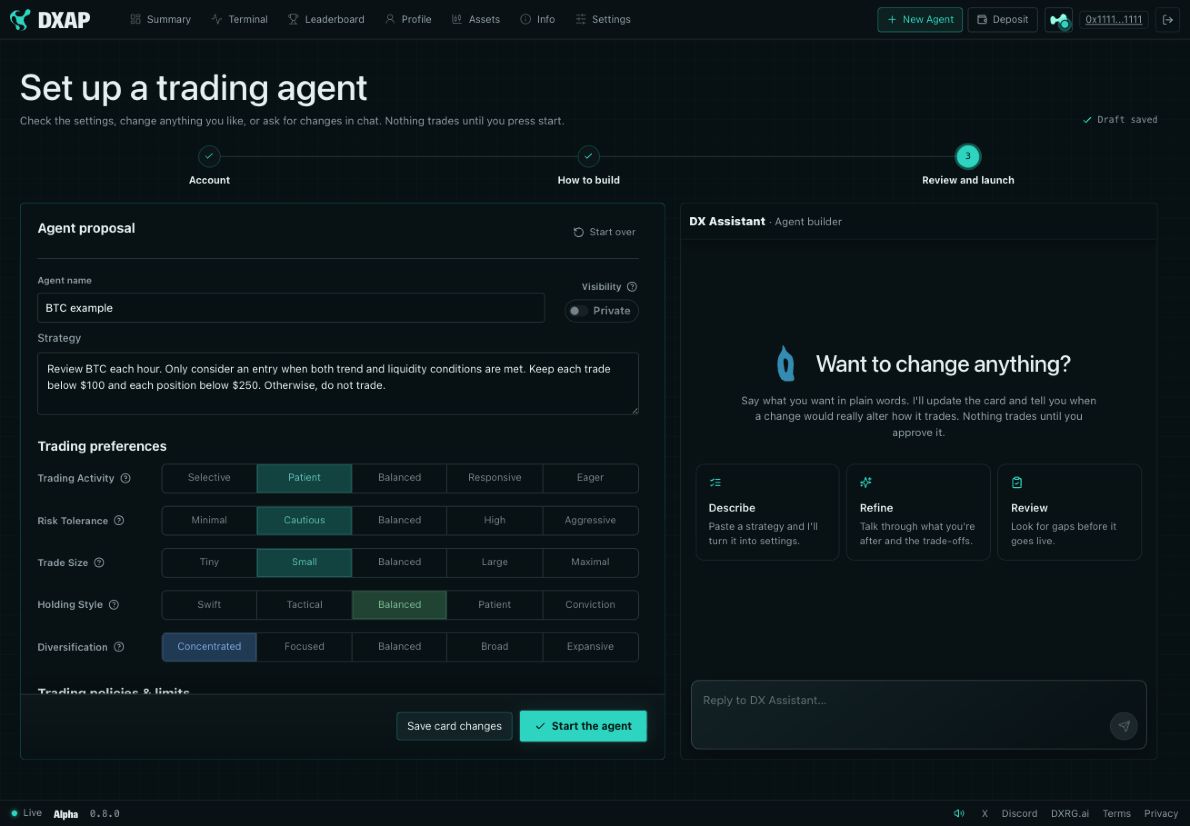
Example account from the DXAP walkthrough. The values illustrate the interface; they are not recommended settings or a performance record.
Save or launch
Section titled “Save or launch”Use Save card changes to keep refining your draft at your own pace. When you’ve reviewed the strategy and its limits, choose Start the agent to launch it.
After launch, check your agent’s settings and next scheduled turn in the workspace. Your agent runs autonomously from there, following its schedule and triggers even when your browser is closed. Follow its activity to see what it decides and how its trades unfold.